IoT-Based Temperature and Humidity Monitoring System

.png?raw=true)
Introduction: Beyond the Basic IoT Project
In the age of the Fourth Industrial Revolution (Industry 4.0) and the ubiquitous Internet of Things (IoT), the ability to capture, analyze, and act upon real-time environmental data is no longer a luxury—it's a necessity. This project, the IoT-Based Temperature and Humidity Monitoring System, transcends a simple hobbyist gadget. It serves as a foundational blueprint for professional-grade, local-first monitoring solutions, integrating embedded systems, network programming, and modern web development into one cohesive and powerful package.
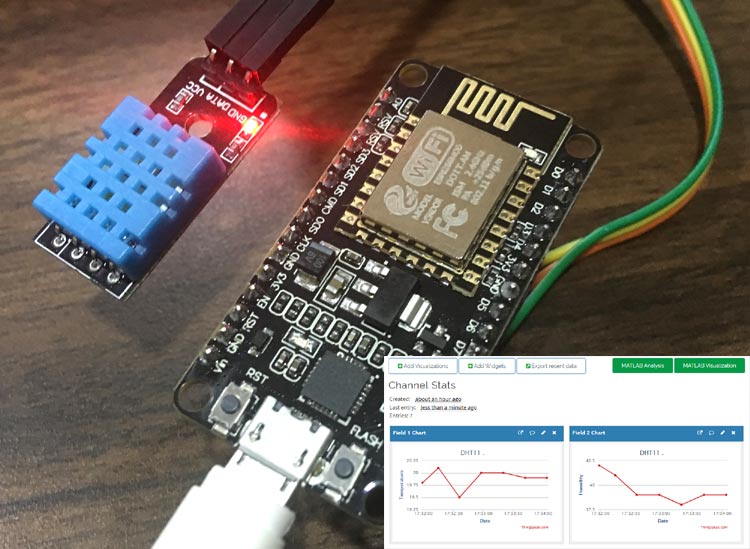
This system leverages the formidable ESP32 microcontroller as its central brain, a choice made for its potent dual-core processor, ample RAM, and integrated Wi-Fi and Bluetooth capabilities. It's not just a controller; it's a self-contained, web-hosting micro-computer. Paired with the reliable DHT11 sensor for data acquisition and a high-contrast 1.3-inch OLED display for immediate "at-a-glance" feedback, this project delivers a robust, dual-interface monitoring experience.
The system's true elegance lies in its dedicated web dashboard. Hosted directly on the ESP32, this interface democratizes data access. Any device on the same Wi-Fi network—a smartphone, tablet, or laptop—can access the live data feed through a standard web browser, with no special apps required. This local-first approach ensures maximum privacy, zero internet latency, and zero cloud subscription costs.
🧠 The Core Philosophy: Why These Components?
Why the ESP32? This is the heart of the operation. Unlike simpler 8-bit microcontrollers, the ESP32 is a 32-bit dual-core powerhouse. This "dual-core" aspect is critical: one core can be implicitly dedicated to managing the demanding Wi-Fi stack and web server requests, while the other core is entirely free to run the main application logic—polling the sensor and updating the display. This parallel processing ensures that a high volume of web traffic will not interrupt the critical task of sensor reading.
Why the DHT11? As an entry-point sensor, the DHT11 is a "gold standard" for prototyping. It provides calibrated digital output for both temperature and humidity over a single-wire protocol. While less precise than its sibling, the DHT22, or more advanced sensors like the BME280, it is perfect for ambient room monitoring and provides a reliable baseline for learning and building upon.
Why a Local Web Server? This architecture is the key to accessibility and privacy. By serving its own HTML, CSS, and JavaScript, the ESP32 eliminates reliance on third-party cloud platforms. Data never leaves the local network unless explicitly programmed to do so. This is a critical feature for private smart homes, sensitive lab environments, or industrial "air-gapped" networks.
Why an OLED Display? The 1.3" SSD1306 OLED screen provides an essential local feedback loop. It allows for immediate diagnostics and data verification without needing to pull out a phone. Its high-contrast, self-illuminating pixels are sharp, easy to read in any light, and consume very little power, making it a perfect match for an "always-on" monitoring device.
⚙️ Deep Dive: The Journey of a Single Data Point
The system's operation is a continuous, high-speed cycle of data flowing from the physical world to two distinct user interfaces.
Sensing (The Source): Inside the DHT11, a thermistor (for temperature) and a capacitive humidity sensor (for moisture) are constantly measuring their surroundings.
Acquisition (The Collection): Every two seconds, the ESP32's main loop triggers a read. It sends a specific "start" pulse down the single data wire to the DHT11.
Digital Conversion (The Translation): The DHT11 "wakes up," reads its internal sensors, and replies with a 40-bit data packet. This packet contains 16 bits for humidity, 16 bits for temperature, and an 8-bit checksum to verify data integrity.
Processing (The Brain): The DHT.h library on the ESP32 handles the complex, timing-critical task of parsing this 40-bit signal. It validates the checksum and converts the raw binary data into human-readable floating-point numbers (e.g., 25.7 °C and 48.1 %RH). These values are stored in global variables.
Local Display (The Immediate View): Immediately after a successful read, the ESP32 initiates an I2C communication. It sends commands to the SSD1306 display controller, instructing it to clear the old data and draw the new temperature and humidity strings onto its internal buffer. The display.display() command then flushes this buffer to the screen, creating a crisp, real-time update.
Web-Serving (The Network View): This happens in parallel and is event-driven.
The Initial Connection: A user on their phone types the ESP32's IP address (e.g., 192.168.1.100) into their browser.
Serving the App: The browser sends an HTTP GET / request. The ESP32's web server intercepts this, pulls the entire index_html file from its program memory (PROGMEM), and sends it back as the HTTP response.
Browser Renders: The user's phone renders this HTML/CSS, displaying the styled header and data cards, which initially show "--".
The AJAX Request: The JavaScript in the rendered page immediately executes. The fetch('/data') function sends a new, asynchronous HTTP GET /data request back to the ESP32.
The JSON Response: The ESP32's server, seeing the /data request, runs a different handler. This handler takes the current values from the global temperature and humidity variables, packages them into a lightweight JSON string (e.g., {"temperature": 25.7, "humidity": 48.1}), and sends this back to the browser.
Dynamic Update: The browser's JavaScript receives this JSON, parses it, and uses document.getElementById('temp-value').textContent to inject the new values directly into the HTML. The page updates without a full reload.
The Loop: The JavaScript's setInterval ensures this fetch('/data') process repeats every 5 seconds, guaranteeing the web dashboard is always in sync with the live sensor readings.
📊 Expanded Applications & Future Vision
This project is not an end-point; it's a scalable platform.
📈 Immediate Applications
Smart Home & Automation: Monitor a baby's room, a wine cellar, or a cigar humidor.
Smart Agriculture: The core of a greenhouse automation system. The data can be used to control misters, heaters, and ventilation.
Industrial & Commercial: A low-cost solution for monitoring server rooms (preventing overheating), data centers, and storage warehouses for sensitive goods (food, pharmaceuticals).
Scientific & Research: A deployable environmental data logger for labs, terrariums, incubators, or field research.
🔒 The Future Enhancement Roadmap
Data Logging (The Past): Use the onboard SPIFFS flash memory or an external SD card to log sensor readings as a .csv file. A new web endpoint (e.g., /download_log) could be added to download this history for analysis in Excel or Python.
Cloud Integration (The Global View):
Firebase/Cloudflare: (Leveraging your past projects) Use HTTPClient to POST the JSON data to a Cloudflare Worker, which then writes it to a Cloudflare D1 SQL database for a globally accessible, serverless, and robust historical record.
Blynk/Thingspeak: Integrate dedicated IoT platform libraries to send data to pre-built dashboards, enabling global access and charting with minimal code.
Control & Automation (The Action): Add a relay module. Modify the web page to include a "Fan On/Off" button. This button would make a GET request (e.g., /toggle-relay), and the ESP32 would flip a GPIO pin to control a fan, heater, or humidifier. This elevates the project from a monitor to a true cyber-physical system.
Alerting System (The Warning):
Telegram Bot: (Leveraging your past projects) Use a Telegram bot library. If the temperature exceeds 30°C, the ESP32 can send a direct, instant message to your phone: Warning! Server room is 30.2°C!.
Email: Use an SMTP client to send an email alert for critical threshold breaches.
Mesh Networking (The Swarm): (Leveraging your nRF24L01 experience) Use ESP-NOW, a low-power, peer-to-peer protocol. Multiple ESP32s or ESP8266s (each with a sensor) can form a "mesh" and send their data back to this single, central gateway, which then serves all the data on the web dashboard.
Technologies Used
IoTWeb PageEsp32
Created On: Nov 1, 2025
Last Updated: Sep 3, 2026